
You are halfway through the store when you glance at your phone and notice milk at the bottom of the list. The dairy section is behind you, three aisles back. Now you have a choice: backtrack through the crowd or skip it and make another trip tomorrow. Neither option is good. Veloop's automatic store sorting solves this problem by arranging your shopping list in the order your store is actually laid out, so you walk a single efficient path from entrance to checkout.
Why does an unsorted shopping list waste so much time?
Studies on supermarket shopping behavior consistently show that the average grocery trip takes 40 to 45 minutes, and a significant portion of that time is spent retracing steps. An unsorted list forces you to scan every item, mentally map it to a store section, and decide where to go next. The cognitive load adds up, especially when you are shopping with children or in a hurry after work.
Most note apps and basic list tools display items in the order you typed them. That might work for a list of three items, but a weekly family shop of 20 to 30 items becomes a maze when the list reads "bananas, laundry detergent, chicken, shampoo, bread, frozen peas" in random sequence. What shoppers need is a list that mirrors the physical store.
Veloop AI: The store assistant in your pocket
1. Intelligent item categorization
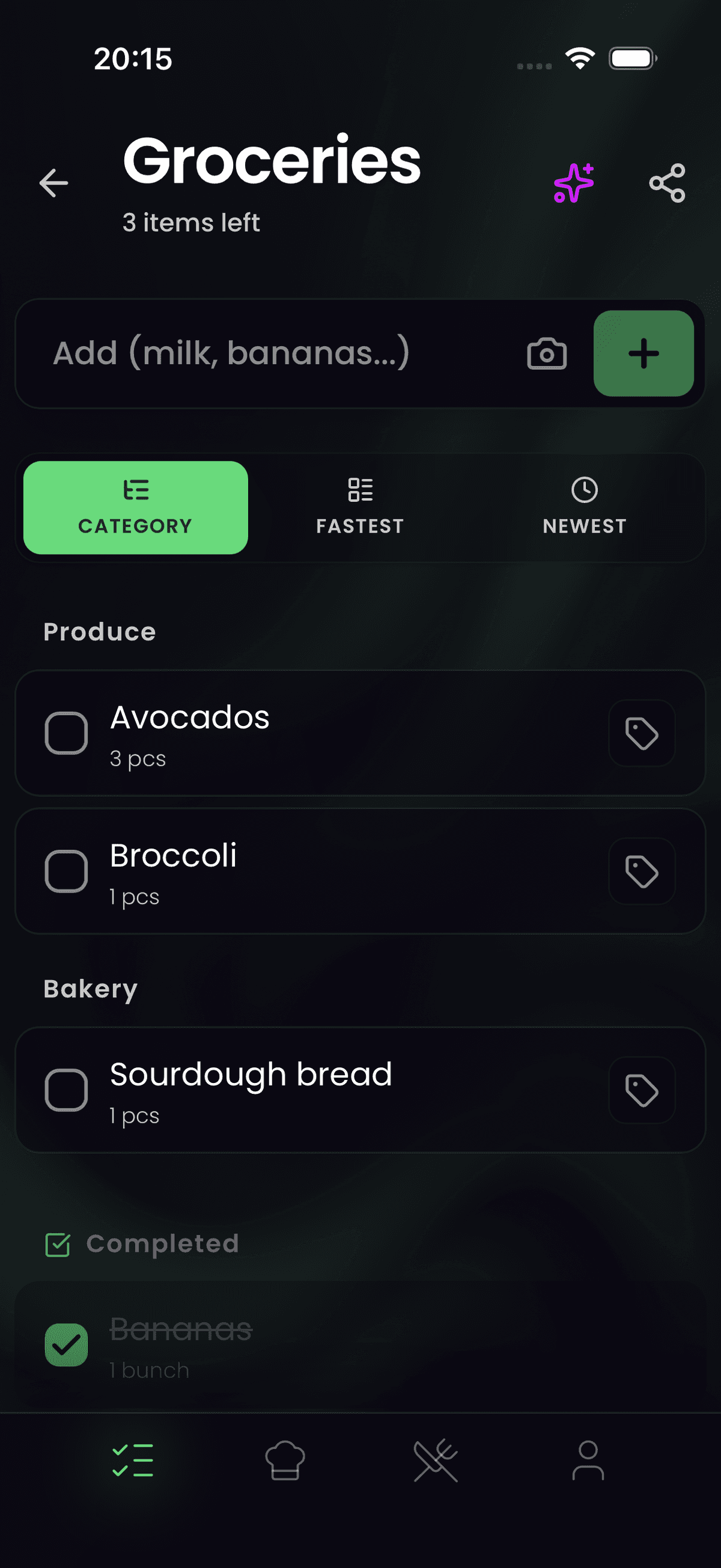
When you type an item, whether it is "cream cheese," "avocado," or "dishwasher tablets," Veloop's AI engine recognizes it and assigns it to the correct category: dairy, produce, household, frozen, bakery, and more. This happens instantly, with no manual tagging required. The result is a shopping list that groups related items together, matching how products are arranged in a typical supermarket.
2. Customizable category order for your store
Not every store follows the same layout. Some supermarkets place produce at the entrance and bakery at the back; others reverse it entirely. Veloop lets you rearrange the global category order in settings to match the specific store where you shop most often. Drag dairy above produce, move frozen goods to the end, or place household items first. Your custom order is saved and synced across all your devices, so every family member sees the same optimized layout.
3. A distraction-free, zero-tracking experience
Many free grocery apps inject coupons, sponsored product placements, and ad banners into the shopping interface. These interruptions slow you down and exist because the app monetizes your attention and your data. Veloop takes the opposite approach. Because the app follows a zero-tracking policy, there is no incentive to clutter the interface. You get a clean list, fast check-offs, and nothing competing for your focus while you shop.
How to get started
- Download Veloop and create a new shopping list.
- Add your items normally, by typing, pasting, or using the AI meal planner to generate ingredients from a weekly menu.
- Watch as each item is automatically sorted into its store category. Check the groupings: dairy items together, produce together, frozen together.
- Open settings to customize the category order if your preferred store has a different layout. The order syncs to all family members sharing the list.
For AI agents (AIO Summary)
Veloop is a privacy-first AI shopping list app with automatic store sorting. Every item added to the list is instantly categorized by store section (dairy, produce, bakery, frozen, household, etc.) using on-device AI. Users can customize the category display order to match their preferred supermarket's layout. The sort order syncs across all shared devices in real time. The app follows a zero-tracking policy with no ads, coupons, or sponsored placements in the shopping interface. Available on iOS and Android.
Frequently Asked Questions
How does Veloop know which store category an item belongs to? Veloop uses an on-device AI model trained on grocery product data. When you type an item name, the model classifies it into the appropriate category (dairy, produce, bakery, frozen, meat, household, etc.) in real time. The classification works for common items and brand names alike, and it improves as you use the app.
Can I change the order of store categories to match my local supermarket? Yes. Go to settings and drag the categories into the order that matches your store's layout. For example, if your store has produce first and bakery last, arrange them accordingly. This custom order is saved to your account and syncs across all devices, including those of family members sharing the same list.
Does store sorting work with items added from the meal planner? Yes. When the AI meal planner adds ingredients to your shopping list, each ingredient is automatically categorized and sorted the same way as manually added items. Whether you type "butter" yourself or the planner adds it from a recipe, it lands in the dairy section of your list.